Start with the rules for your character
This AION 2 skill builder is a planning worksheet for decisions you can check: total points, occupied slots, prerequisite ranks and incompatible choices. Its result means the entered plan fits the rules you declared. It does not prove that a skill is currently obtainable, that a particular item is equipped, or that the plan delivers the best damage.
Record region before copying a build
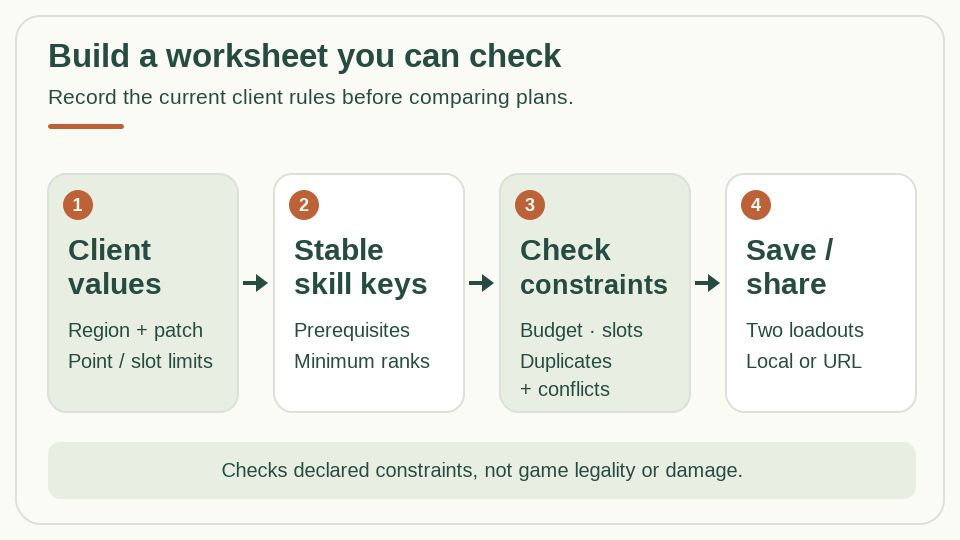
Select your region and class, then add a short client or patch note. The Global class list is based on the official AION 2 overview . Regional releases can differ, so Other lets you document a current-client class without treating the eight Global names as a universal roster. Recheck limits after a relevant update.
Enter a reproducible skill plan
Keep skill identity separate from investment
Copy the displayed skill name into one row. Its stable key, such as s1, is the reference other rows use. Record the selected rank and the total points invested in that skill. Rank is a label here: the builder does not multiply points by rank or guess whether successive ranks have equal prices.
Choose the category you actually need
Classify each entry as active, passive or Stigma, using the applicable client. A row uses one slot of that category. Fill all three limits, including zero for a category you cannot equip. Do not put several alternatives into one named row; separate entries make the trade-off visible and allow duplicate checks.
Understand the point-budget calculation
The worksheet adds the points entered on all selected rows, then subtracts that sum from the available budget. In the hypothetical example, investments of three, two and one total six. Against eight available points, two remain. Those numbers demonstrate arithmetic, not a published AION 2 allocation cap.
An empty budget is unresolved rather than zero. A zero-point row is permitted when you deliberately enter zero; a completely blank row is ignored. Negative values, decimals, scientific notation and unsafe totals are rejected. An over-budget result identifies the excess, helping you decide what to remove before spending in the game.
Check prerequisites and exclusive choices
Use keys and minimum ranks
Enter a dependency as s1:2 when another row requires skill s1 at rank two. Multiple prerequisites use commas. The checker flags a missing row or an insufficient recorded rank. It also detects a skill depending on itself and longer circular chains; neither establishes a usable unlock order.
Represent alternatives explicitly
Give incompatible entries the same exclusive-group label. Only one member may remain in the selected loadout. This checks the relationship you supplied, rather than discovering hidden game restrictions. If a prerequisite is conditional on equipment or another board, confirm it separately instead of inventing a row that pretends to unlock it.
Plan PvE around a repeatable task
Use the PvE workspace for a specific activity: a solo route, a coordinated dungeon role or a practice encounter. Record why each selected action belongs there. An opener, a required follow-up, a defensive answer and a support responsibility answer different questions; their value is not captured by point cost alone.
Before replacing a useful defensive choice with another attack, consider the encounter demand and your party assignment. The class comparison helps distinguish role expectations. This worksheet does not rank classes, simulate rotations, estimate healing or infer a recommended build from a pet bonus.
Keep PvP changes in a separate loadout
Switch to PvP to edit a second set of rows and limits. Your first set stays available in this visit. Use the second plan to record deliberate alternatives, such as reserving a slot for a response you need in that activity, while keeping the original plan intact for comparison.
Compare displays point spending, names unique to each plan and shared names whose rank, investment or category differs. It does not declare a winner. Both sides need valid entered constraints before a complete comparison is possible; a partially written alternative should not be mistaken for a finished recommendation.
How the AION 2 skill builder checks your loadout
Within your declared budget means the worksheet found no conflict in the supplied numeric limits, slots, dependencies and exclusive groups. It cannot confirm skill unlocks, equipment eligibility, server-specific exceptions or the accuracy of a borrowed guide. Check those conditions on your own character before applying the plan.
Changing an input clears the old result and disables actions that would reuse it. This matters when a small rank change breaks a dependency or a new Stigma exceeds a slot limit. Run the check again after editing; an earlier success message is not evidence for a different configuration.
Save and restore a local workspace
Save workspace stores both loadouts, their context and a save time in this browser only. It does not connect to your game account, synchronize devices or update costs after a patch. Load restores entries for review and requires a fresh check. An empty alternate loadout can remain a draft; incomplete named rows need finishing or removal before saving.
Clear saved workspace removes this tool’s saved record while leaving current onscreen entries alone. Browser clearing or unavailable storage can prevent restoration. Keep a copied summary if the plan matters, and read the local-tool privacy explanation before using a shared browser.
Build planner: save and share a worksheet
Copy share link encodes both loadouts in the address fragment, the part after the hash symbol. The site does not create a hosted build profile. Anyone who receives that address can read the included names and note, so include game context rather than player identifiers or private information.
A shared plan is an editable reference, not trusted evidence. The recipient should verify its region, patch, limits and dependencies. Oversized or damaged links are rejected without replacing current entries. When clipboard access fails, the page supplies selectable text; copying is reported successful only after the browser confirms it.
Use the right tool for the next decision
This page does not calculate Daevanion boards, equipment bonuses, animation timing, damage or pet progression. Mixing those systems into one point budget would create false precision. Keep the skill decision here and use a separate resource plan when choosing the next collection upgrade.
The Genus Insight explanation distinguishes family analysis from an individual pet’s Insight. The Genus calculator handles an entered family plan; the Pet Soul Planner handles one pet’s upgrade materials. None of these links establishes an optimal skill and pet combination.
Watch the actual worksheet demonstration
The video demonstrates this website with the clearly labeled hypothetical example. It shows an eight-point budget, three selected rows and a dependency on s1 at rank two. It is a recording of the tool operating, not a game-client test or evidence for real skill prices.
Walkthrough transcript
- Load the hypothetical example and check the PvE loadout: six points used, two remaining.
- Lower the recorded rank of s1 to one and check again to expose the unmet prerequisite.
- Restore rank two, then compare the preset PvE and PvP worksheets.
- Save or copy only after reviewing the checked context.
Skill-builder questions
Is this an official skill tree?
No. It is an independent worksheet using limits and relationships you enter. Official class names provide context; they do not turn custom rows into an official skills database.
Why can a checked plan fail in the game?
A required unlock, item, regional restriction or prerequisite may be missing from your entries. Revisit the relevant client panel and amend the worksheet; do not treat a green check as permission to ignore the game.
Can another class use my shared plan?
A link preserves its selected class and region. Copying its structure can help organize a new plan, but every name and rule must be replaced or confirmed for that character.