What the AION 2 Genus Insight calculator covers
Use this page when you have a board target and several possible pet upgrades, but need to separate their resource requirements. It answers two numerical questions: how much EXP your declared plan adds, and how many fixed-price analysis attempts your declared budget covers. It does not choose a combat stat, reproduce the game’s random rolls, or discover an upgrade price.
For system terminology and regional evidence, read the full Genus Insight guide. For only one pet’s level costs, the Pet Soul Planner is the shorter workflow. Here, the useful difference is a multi-pet view with independent Soul inventories and a separate analysis budget.
Read your board before entering a target
Keep current and target EXP on one scale
Copy the board name, current EXP and intended threshold from the same region and progression screen. A counter such as “progress towards the next level” cannot be compared directly with a cumulative lifetime total. If your client resets the visible counter at a level boundary, first express both entries on one consistent scale; this calculator does not infer the missing thresholds.
Use the source note for a patch date, screenshot reference or short reminder. Choosing Global, Taiwan or Korea labels your plan; it does not load a verified regional formula. Changing the label never changes a cost behind your back.
Plan each owned pet once
Enter costs and EXP in transition order
A level 1 to 3 plan contains two transitions: 1 → 2 and 2 → 3. Put the two Soul costs in one comma-separated list, then put the two corresponding EXP awards in the other. Do not enter the final pet’s total EXP again if the list already contains the incremental awards. An unchanged level needs no transitions and contributes no upgrade EXP.
Use one row for each pet. Duplicate names are rejected after ignoring capitalization and extra spaces, preventing an accidental second claim on the same stock. The tool supports eight rows and levels 1–20 as input limits, not as a claim about any service’s pet cap.
Why matching Souls stay separate
Pet A’s spare Souls cannot automatically fund Pet B’s missing materials. Each row subtracts only its own usable stock from its own entered costs. No combined “universal Soul balance” is produced. Count unspent, eligible materials rather than lifetime drops, pending rewards or an item with a similar name.
This workflow starts after the pet is owned. A first unlock can involve a different reward or resource, so it is not silently included. If another confirmed action will add board EXP, enter that award under Other planned EXP without treating it as an owned pet’s Soul inventory.
Read planned EXP and currently affordable EXP differently
Projected EXP equals current EXP plus all listed upgrade awards plus Other planned EXP. Its remaining gap assumes every planned task is eventually completed, including upgrades for which you still lack Souls. A zero projected gap therefore does not mean every material is ready.
The owned-Souls-only result is narrower. For each pet, it pays upgrades in order until the first unaffordable transition, then stops that row. It excludes Other planned EXP because the calculator cannot establish that action’s readiness. Other upgrade currencies and prerequisites are not checked. Compare both results before selecting a farming target: one describes the completed plan, while the other describes upgrades supported by stock already entered.
Follow the hypothetical two-pet example
Select Load hypothetical example, then Calculate Genus plan. These numbers demonstrate the tool and are not AION 2 prices. The board begins at 100 EXP with a target of 500. Example Pet A needs 10 and 20 Souls for two upgrades, awarding 100 and 150 EXP; it owns 15 Souls. Example Pet B needs 25 Souls for one 200-EXP upgrade and owns 40.
The full plan adds 450 upgrade EXP and 50 other planned EXP, projecting 600. Pet A still needs 15 matching Souls. With current stock alone, A completes only its first upgrade and B completes its one upgrade: 100 current + 100 + 200 = 400 EXP, leaving a 100-EXP gap. B’s surplus cannot close A’s shortfall.
Budget Soul Crystals and Kina together
The smaller purchasing limit is the bottleneck
Turn on the analysis budget, or choose Analysis spending budget only to skip pet inputs. Enter available crystals, available Kina and both prices per attempt. The count is the smaller whole-number quotient. With 120 crystals, 20,000 Kina and prices of four crystals plus 1,000 Kina, crystals cover 30 attempts but Kina covers 20. The result is 20 attempts, leaving 40 crystals and no Kina.
A known zero price makes that resource non-limiting. If both prices are entered as zero, the result asks you to check them rather than displaying infinite attempts. The count is spending capacity, not a prediction of good lines, a guaranteed grade or analysis EXP.
Recalculate after locking or changing the plan
Read the price displayed after setting the locks you actually intend to use. If a lock, discount, event or progression change alters that price, replace the relevant inputs and calculate again. A fixed-price budget cannot model a session whose prices change halfway through without splitting the session.
For example, reserve the cost of the first stage, then use its remaining resources as a new budget for the next stage. Never spend the same starting stock in both stages. Input changes clear the old result and disable copying or saving until recalculation, reducing the risk of keeping an obsolete total.
Use the resource-flow diagram
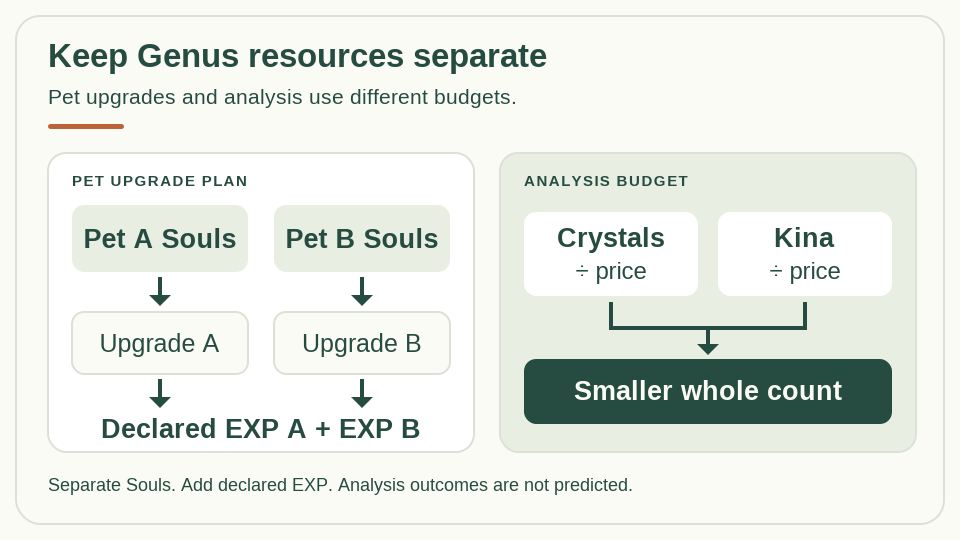
Follow the two branches separately. Named pet Souls fund their matching upgrades and declared EXP awards; Soul Crystals and Kina fund analysis attempts. The diagram deliberately has no arrow that converts spare Pet A Souls into Pet B Souls or promises an analysis outcome.
Watch the website calculator walkthrough
The recording demonstrates this website with hypothetical inputs. It is not footage of a game-client upgrade or proof of a current game cost.
Walkthrough transcript
- Load the hypothetical example and inspect its source note.
- Calculate and compare projected EXP with owned-Souls-only EXP.
- Find Pet A’s separate shortfall and the Kina-limited analysis count.
- Change an input, observe the stale result clear, and calculate again.
- Save the checked plan, then load it and confirm that recalculation is requested.
Save useful context without uploading the plan
Save keeps the entered region, board, source note, transitions, budget and save time in this browser. It is explicit local storage, not an account backup or synchronization service. Load restores compatible inputs but requires another calculation; it does not recheck your client. Clear saved plan removes that saved record while leaving current entries available.
Private browsing, cleared storage or browser restrictions can prevent persistence. Copy offers a manual text fallback if clipboard access fails. Avoid account identifiers in pet names or notes; fixed analytics events do not contain your entries. See the privacy notice for the site’s other services.
Resolve missing values before using the result
Blank means no usable value was supplied, not free. Enter zero only when the corresponding field is known to be zero. If costs and awards contain different numbers of transitions, check the selected levels and list order. Whole numbers are required, and oversized totals are rejected rather than rounded into a plausible answer.
When a source disagrees with your client, keep the discrepancy in the note and use the applicable panel for spending decisions. Compare concrete collection choices in the Natura, Fera and Varian comparisons, then inspect the named reward through the pet database or pet source directory. Those links identify candidates, not guaranteed yields.